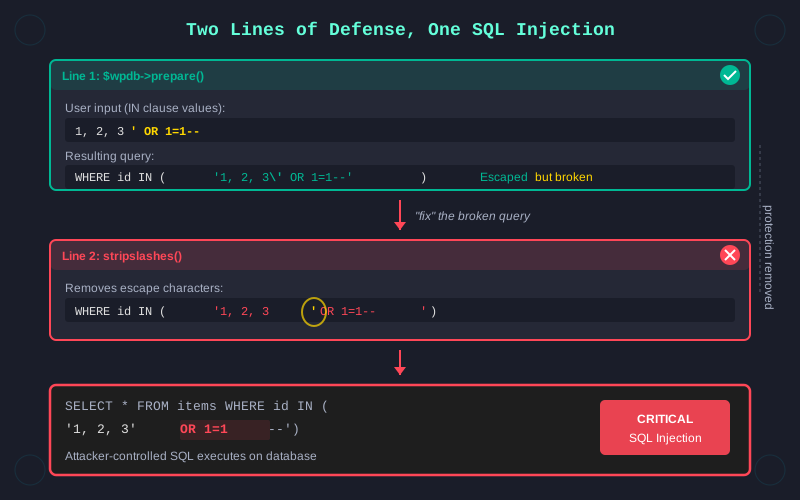
Two lines of code. Both written for security. Together, they created a critical SQL injection.
During a bug bounty session focused on WordPress plugins, I found a SQL injection in a place that looked already fixed. The developer had done the right thing. They used $wpdb->prepare(), the WordPress function specifically designed to prevent SQL injection. Placeholders were in place. User input was passed through %s. Escaping was handled by the framework.
And yet, the vulnerability was real.
The issue came down to how the prepared statement was constructed. The query used an IN clause. You know the pattern: SELECT something FROM table WHERE id IN (1, 2, 3). The developer needed to pass a dynamic list of values into that clause.
Instead of creating individual placeholders for each value, they built a comma-separated string from user input and passed the entire thing as a single %s placeholder. From WordPress's perspective, that was one string. So prepare() treated it like one string. It wrapped the whole list in quotes and escaped any internal quotes that might break the SQL syntax.
// Line 1 (the "safe" prepared statement)
$ids_csv = $_GET['ids']; // e.g. "1,2,3"
$query = $wpdb->prepare(
    "SELECT * FROM {$wpdb->prefix}orders WHERE id IN (%s)",
    $ids_csv
);
The query worked in testing. Values were escaped. Prepare() did its job. But the result wasn't what the developer intended. The IN clause was now comparing against a single quoted string instead of a list of individual values. Functionally, the query broke. It stopped returning the expected results.
So someone added a second line to fix it: stripslashes().
// Line 2 (the "fix" that re-opens the door)
$query = $wpdb->prepare(
    "SELECT * FROM {$wpdb->prefix}orders WHERE id IN (%s)",
    $ids_csv
);
$query = stripslashes( $query );
$wpdb->get_results( $query );
That function did exactly what its name suggests. It removed the backslashes that $wpdb->prepare() had added to escape dangerous characters. The query started working again. The IN clause returned correct results. The developer moved on.
But those backslashes weren't decoration. They were the security layer. By stripping them, the second line undid everything the first line had done to prevent injection. User-controlled input was now flowing into the SQL query without proper escaping.
Two functions. One to protect the query. One to make it work. The combination opened the door to SQL injection.
This is the kind of vulnerability that's easy to miss in a code review. Each line makes sense on its own. Prepare() is the correct approach. Stripslashes() solves a real problem the developer was facing. The issue only becomes visible when you understand how they interact.
I've seen similar patterns before. A developer implements a security control correctly, then encounters a side effect that breaks functionality. Under pressure to ship, they add a workaround that neutralizes the original protection. The application works. The tests pass. The vulnerability ships to production.
To understand why, you need to know how %s works. The placeholder in $wpdb->prepare() is designed for a single scalar value, not a list. When you pass a comma-separated string like "1, 2, 3" into a single %s, WordPress treats it as one atomic value. The resulting query looks something like WHERE id IN ('1, 2, 3') instead of WHERE id IN (1, 2, 3). That's functionally wrong, but it's securely wrong.
The correct fix would have been to generate one placeholder per value. Build an array of %d (or %s) tokens matching the number of input values, join them with commas, and pass each value individually to prepare(). That way, every value gets its own escaping, and the IN clause works as intended.
// Correct (one placeholder per value, no stripslashes())
$ids = array_map( 'intval', (array) $_GET['ids'] );
$placeholders = implode( ',', array_fill( 0, count( $ids ), '%d' ) );
$query = $wpdb->prepare(
    "SELECT * FROM {$wpdb->prefix}orders WHERE id IN ($placeholders)",
    $ids
);
$wpdb->get_results( $query );
Instead, the developer chose the path that restored functionality fastest. Understandable. But dangerous.
What makes this hard to catch is that both lines make sense on their own. If you asked the developer why they used prepare(), they'd give you a correct answer about preventing SQL injection. If you asked why they added stripslashes(), they'd explain the escaping issue with the IN clause. Both answers are reasonable. The combination is the problem.
This is something I look for specifically when reviewing WordPress plugins. Any time prepare() is used near an IN clause, there's a chance that someone worked around the escaping in a way that defeats the protection. It's a known antipattern in the WordPress ecosystem, but it keeps showing up because the correct solution requires more effort than the broken one.
During the session, I confirmed the injection, documented the reproduction steps, and reported it through the appropriate channel. The finding was confirmed and a CVE was assigned.
The takeaway is simple: security means more than using the right functions - you have to understand what they actually do and make sure the surrounding code doesn't undo their work. A prepare() followed by a stripslashes() is worse than no prepare() at all, because it creates the illusion of protection where none exists.
The next time you see a security function in code, don't just check that it's there. Check what happens to its output.
