If you're running automated scans and fighting over the same low-hanging fruit, you're missing the real gold. It's sitting right there in plain text.
JavaScript files.
Most researchers skip them. They fire up their scanner, grab the easy wins, and move on to the next target. Meanwhile, the application is literally handing out its secrets in files that anyone can read.
Here's what I've found just by reading JavaScript files over the years:
- Hardcoded API keys with admin-level permissions
- Internal endpoints that weren't supposed to be public
- Full API route maps, including the ones behind "hidden" features
- Authorization logic that revealed exactly how to bypass it
- Comments from developers describing known issues they never fixed
That last one always gets me. Developers leaving TODOs and FIXMEs about security problems they know about but haven't gotten around to fixing. It's like leaving a note on the door saying "the lock is broken."
You don't need fancy tools for this. Open DevTools. Read the code. Search for keywords like api, token, secret, admin, internal, /v1/, TODO, FIXME. Follow the data flow. See where tokens are stored. See where requests go. See what the frontend knows that the backend assumed nobody would see.
// Example of what you find once you actually read the bundle
const ADMIN_API = "https://api-internal.example.com/v2";
const DEBUG_TOKEN = "eyJhbGciOiJIUzI1NiJ9..."; // TODO: remove before prod
function getProvisioningKey() {
  return fetch(ADMIN_API + "/_debug/bootstrap").then(r => r.json());
}
Developers write code for functionality. Attackers read it for opportunity.
Most applications bundle their frontend code into a few JavaScript files. Sometimes minified, sometimes not. Either way, the logic is there. The endpoints are there. The business rules are there. And if someone got lazy with environment variables or hardcoded something they shouldn't have, that's there too.
I want to share a finding I reported on HackerOne that started exactly this way.
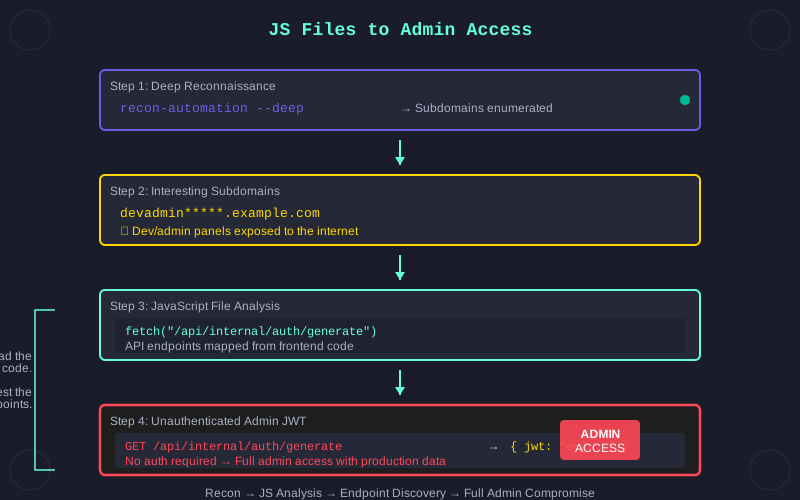
The flow went like this:
I ran my recon automation against the target. Deep reconnaissance, not just a quick subdomain scan. The kind of recon that takes time but surfaces things that surface-level scanning misses.
The results turned up some interesting subdomains. Dev and admin panels that shouldn't have been exposed. The naming patterns made them easy to spot once you knew what to look for.
I started going through the JavaScript files on these subdomains. Not scanning them. Reading them. Looking at the code, understanding what the application was doing, mapping out the endpoints it was calling.
I found several API endpoints referenced in the frontend code. Most of them behaved as expected. Authentication required, proper access controls, nothing unusual.
One of them didn't.
This endpoint was callable without any authentication. No token, no session, no credentials of any kind. You just hit it and it responded. But it didn't just respond with data. It responded with a valid JWT.
$ curl https://dev-admin.target.example.com/api/v1/session/init
{
  "token": "eyJhbGciOiJIUzI1NiIs...",
  "role":  "admin",
  "expires_in": 86400
}
A valid JWT with admin-level access.
From there, it was full access to the admin panel. User management, discounts, product catalog, the works. Create users, delete users, modify pricing, add or remove products. Complete administrative control over the platform.
The interesting part is that this was a development version of the admin panel. But it wasn't running on test data. It contained a full copy of the production database. Real customer data. Real user accounts. Real everything.
The chain was simple:
- Deep recon surfaces exposed dev subdomains
- JavaScript files on those subdomains reveal API endpoints
- One endpoint returns a valid admin JWT without authentication
- JWT grants full access to admin panel with production data
Every step of that chain started with reading code that was publicly accessible. No exploitation of memory corruption. No complex attack chains. Just reading what was already there and testing what it did.
This is why I keep saying that skipping JavaScript files is a mistake. The application is telling you everything. The endpoints it talks to. The parameters it sends. The tokens it stores. The features it hides behind flags. The admin routes it knows about but doesn't show in the navigation.
All of it is in the code. You just have to read it.
The severity on that report was rated High. I'll let you draw your own conclusions on that one.
If you're not already making JavaScript analysis a core part of your methodology, start now. Before your next scan, before your next automated run, open the JS files and read them. You might be surprised what you find.
