Most bug bounty recon tooling stops at the same point. Subdomains found. Live hosts probed. Nuclei run. A list of URLs and a folder of downloaded .js files. And then the human goes to bed because sifting through a 3 MB webpack bundle at 11pm is nobody's idea of fun.
The findings that matter live past that point. I wrote a while ago about why you shouldn't skip JavaScript files at all. This one is about what to do once the file is open.
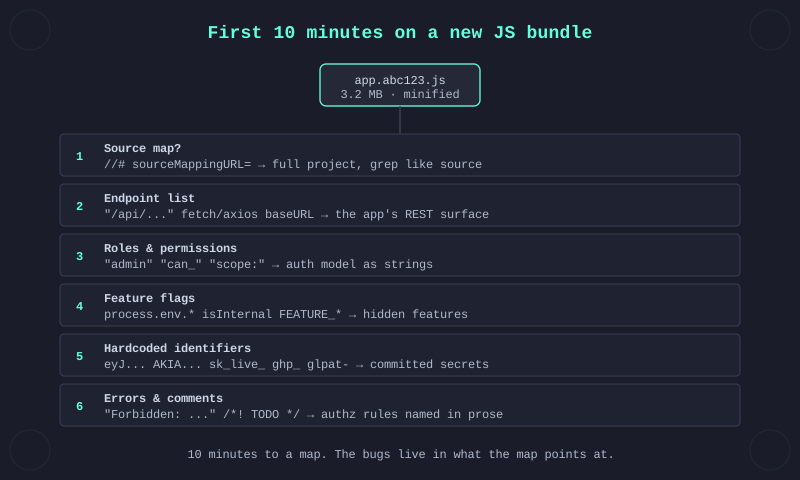
Ten minutes is roughly the window I give a new bundle before I decide whether the target is worth deeper time. It's not long, but it's long enough to find the three or four threads that tell you if there's something here. The order below is the one I use. Earlier items feed the later ones, so work top-down unless a specific item is a dead end.
First, always, look for a source map. If the bundle shipped with its source map, the next nine minutes are easy.
grep -oE '//# sourceMappingURL=.*' app.abc123.js
# → //# sourceMappingURL=app.abc123.js.map
curl -s https://target.example.com/static/app.abc123.js.map -o app.map
A real source map gives you the original file tree: unminified components, route definitions with real function names, comments the developer wrote during feature work. Tools like sourcemapper or a quick unwebpack-sourcemap run turn the .map into a project directory you can grep like regular code. A bundle with a shipped source map is a completely different level of effort than one without.
If no map reference, don't stop. A missing sourceMappingURL doesn't mean there's no map. Sometimes it's at the default path next to the bundle. Try app.abc123.js.map directly.
Second, get the endpoint list out. Before reading any code, know what surfaces the frontend talks to.
grep -oE '"/api/[^"]+"' app.abc123.js | sort -u
grep -oE '(?:fetch|axios|request)\s*\([^)]+\)' app.abc123.js
grep -oE 'baseURL["'\'']?\s*[:=]\s*["'\''][^"'\'']+' app.abc123.js
The first line catches literal route strings. The second catches runtime calls where the path might be built from constants. The third finds the base URLs that prefix all the others. Take the union of these, deduplicate and you have the app's REST surface in one list.
Two things to pay attention to as you scan it. One, any path ending in /internal/, /_admin/, /dev/, /debug/, /v0/, /legacy/. Two, any path the navigation never takes you to. Both are signals the endpoint is reachable but not advertised.
Third, pull out the role and permission strings. The frontend almost always ships the app's access-control model as strings, because UI conditionals are written like if (user.role === 'admin').
grep -oE '["'\''](role|roles|permissions?|scope|can_|has_|is_)[^"'\'']{0,40}["'\'']' app.abc123.js | sort -u
grep -oE '["'\''](admin|superuser|manager|owner|internal|support)["'\'']' app.abc123.js | sort -u
What this surfaces is the list of roles the backend knows about and the capability checks the frontend gates on. You now know what the access model looks like from the outside. If any of those roles or capabilities wasn't exposed during your normal account-creation flow, that's a role the server still honours but the UI doesn't let you pick. Register, inspect your token, swap a claim, try the privileged endpoint.
Fourth, feature flags and environment branches. Every non-trivial frontend has flags.
grep -oE 'process\.env\.[A-Z_]+' app.abc123.js | sort -u
grep -oE '(isProd|isDev|isInternal|DEBUG|FEATURE_[A-Z_]+|FLAG_[A-Z_]+)' app.abc123.js | sort -u
Flags tell you two things. One, what features the team built and then hid. Two, how the frontend decides which branch to run. A URL parameter, a cookie, a header, a config endpoint. If you can flip the condition the frontend checks, the feature is reachable. ?debug=1, localStorage.setItem('isInternal', 'true'), a header-based override on the API. All of those have shipped.
Fifth, hardcoded identifiers. Strings that shouldn't be in a bundle at all.
# JWTs
grep -oE 'eyJ[A-Za-z0-9_-]{10,}\.[A-Za-z0-9_-]{10,}\.[A-Za-z0-9_-]{10,}' app.abc123.js
# AWS keys, Stripe, GitHub PAT, GitLab token
grep -oE '(AKIA|sk_live_|pk_live_|ghp_|glpat-)[A-Za-z0-9]{16,}' app.abc123.js
# Long base64/hex blobs
grep -oE '[A-Za-z0-9+/]{40,}={0,2}' app.abc123.js | head -20
Most hits are going to be false positives. CSS data URLs, webpack chunk hashes, font subsets. Filter aggressively. The real hits are short and out of place. A JWT in a bundle is a JWT somebody committed instead of fetching. A Stripe live key is a live key. A GitHub PAT is credentials.
Developers are not supposed to commit these. They commit them anyway. Regularly enough that the above regexes pay their grep cost on most targets.
Sixth, error strings and comments. The bundle minifies identifiers but not string literals, because strings are what the app shows users. That means error messages survive.
grep -oE '"[^"]{20,120}"' app.abc123.js | grep -iE 'error|fail|forbid|denied|unauth|invalid|token'
grep -oE '/\*[!*][^*]{10,}\*/' app.abc123.js
grep -oE '//[!*][^\n]{10,}' app.abc123.js
Error-message mining surfaces features the UI won't let you reach. An error text like "Cannot delete payment method: user is not the account owner" tells you there's an authorization check on that action. Somewhere else in the bundle is the code path that calls that action. Find it. You now have a named endpoint with a named authorization rule to test.
License-banner comments (/*! jQuery ... */) you can skip. What's useful is TODO, FIXME, HACK, @deprecated, author names, bug ticket references. Those survive minification when the author used a preserved-comment flag (/*! ... */). Sometimes they include the exact gotcha the developer knew about and never fixed.
If running six greps over every JS file on every target sounds repetitive, it is. A few tools wrap the pattern into one pass. jsluice (BishopFox, Go, tree-sitter based) pulls endpoints, secrets and URLs out of a bundle in one run. LinkFinder (Python) is the classic option for endpoint extraction. trufflehog is the strongest general-purpose secrets scanner and works fine against .js files, not just git repos. sourcemapper reconstructs the original project tree when a source map is present, so step 1 becomes a single command. Use them as a first pass. What they will miss is what a human reading the bundle catches without effort: a permission string that isn't in their pattern list, a feature flag with a non-standard name, an error message that hints at an endpoint shape. The automation is a filter, not a replacement. If the automated pass comes back empty and the bundle is large, read it anyway.
At the ten-minute mark you should have: a rough endpoint list, a role model, a flag list, a maybe-leaked credential or two and a handful of "interesting but not yet a vuln" notes. That's not findings. That's a map.
The next two hours is where findings happen and this is the honest part. Most targets don't pay off past the ten-minute mark. Most have clean bundles, no source maps, no hidden roles, no leaked keys. You will waste more ten-minute windows than you will turn into reports. The discipline is not treating the ten minutes as a test you pass. It's treating it as triage and moving on without guilt when the bundle has nothing to say.
The bundles that do have something to say tend to have several of these signals at once, not one. A source map plus hidden roles plus a feature flag that the URL flips on is a day of testing and usually a High. A lone TODO comment is a curiosity.
One last thing. The regexes above work at the literal-bundle level. Once you've got a source map, rerun them on the unpacked project. The signal density goes up by a factor of ten because you're grepping original code, not the minifier's output. If you get a source map, the priority order reorders. Source map first, then steps two to six on the unpacked tree.
Everything else downstream, testing the endpoints, confirming the auth bypass, chaining into something payable, is the same work as any other bug bounty target. The part that's different is getting to the list of things worth testing in ten minutes instead of an afternoon. That's what reading the bundle buys you.
