Most WordPress plugins start as someone's side project. A developer builds a booking form for a client, sees it works, publishes it to wordpress.org. Six months later it's on ten thousand sites. Two years later, a hundred thousand. The code has not been rewritten in that time. It has picked up features. Analytics. An admin dashboard. Customer notifications. A premium tier. The security assumptions from day one never got revisited.
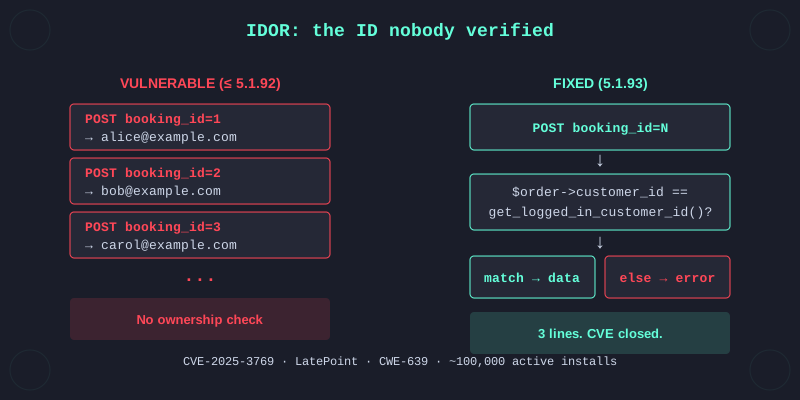
That's where CVE-2025-3769 lived. LatePoint is a calendar and booking plugin with about 100,000 active installs. An AJAX handler called view_booking_summary_in_lightbox, sitting in lib/controllers/customer_cabinet_controller.php, accepted a booking ID from the request and rendered a lightbox with the customer's name, email, appointment time and service. No ownership check. Feed it any valid booking ID, get back the booking.
That's an IDOR. CWE-639. The kind of bug taught in every intro web security course. Still shipping in 2025.
An IDOR is when your app exposes a reference to an internal object (a database ID, a file path, an account number) and trusts the user not to tamper with it. If /api/booking?id=42 returns booking 42 without checking whether the caller has permission to see booking 42, you have an IDOR. The formal name captures it well: authorization bypass through a user-controlled key. The authorization decision is being made from data the attacker controls. Flip the ID. Change the result.
Here is the vulnerable function, verbatim from LatePoint 5.1.92, at lib/controllers/customer_cabinet_controller.php line 67:
public function view_booking_summary_in_lightbox() {
    if ( ! filter_var( $this->params['booking_id'], FILTER_VALIDATE_INT ) ) {
        exit();
    }
    $booking                  = new OsBookingModel( $this->params['booking_id'] );
    $order_item               = new OsOrderItemModel( $booking->order_item_id );
    $order                    = new OsOrderModel( $order_item->order_id );
    $this->vars['booking']    = $booking;
    $this->vars['order_item'] = $order_item;
    $this->vars['order']      = $order;
    $this->format_render( __FUNCTION__ );
}
The validation checks one thing: is booking_id a valid integer. If yes, the handler loads that booking by ID, follows the foreign keys to the order item and the order, and renders the lightbox template with all three objects. At no point does it verify that the booking belongs to the caller.
LatePoint does not use WordPress's standard wp_ajax_nopriv_ hook. It ships its own access-control system, registered in the constructor of the same file starting at line 19:
$this->action_access['customer'] = array_merge( $this->action_access['customer'], [
    ...
    'view_booking_summary_in_lightbox',
    ...
] );
This says: the action requires a logged-in customer. And LatePoint's base controller honors it. So the bug is not "any visitor can dump the database". The bug is "any customer can dump the database". In practice that distinction is thin. On a typical site running LatePoint, customer registration is the booking flow itself. You complete a booking and you have an account. No admin approval. From there the IDOR is an ID sweep away.
The fix shipped in 5.1.93. Same file, same function, three added lines right after the model loads:
$booking    = new OsBookingModel( $this->params['booking_id'] );
$order_item = new OsOrderItemModel( $booking->order_item_id );
$order      = new OsOrderModel( $order_item->order_id );

if ( $order->is_new_record() || ( $order->customer_id != OsAuthHelper::get_logged_in_customer_id() ) ) {
    $this->send_json( array( 'status' => LATEPOINT_STATUS_ERROR, 'message' => __('Not Allowed', 'latepoint') ) );
}
The order has to exist, and its customer_id has to match the currently logged-in customer. No match, no data.
The same pattern was missing in two sibling functions in the same file: view_order_summary_in_lightbox at line 57 and scheduling_summary_for_bundle at line 46. The 5.1.93 changeset patched all three. One review pass, three findings. Always look at the neighbors when you spot a bug of this shape. The developer who wrote one will have written the others.
This bug is from April 2025. If you're reading this in 2026 and wondering whether LLM assistants change the workflow, yes, at the edges. Feeding a plugin's source tree to Claude Code or a competent coding assistant gets you a first-pass audit in seconds, and it will surface exactly this class of missing ownership checks. What does not go away is the judgment. The LLM will flag dozens of things, plenty of them false positives. Knowing which _nopriv_ handler actually matters, whether a custom ACL is effective, which finding deserves a reproducer, that still needs you reading the code. The assistants speed up the grep. They do not replace the thinking.
Now the part that matters if you're starting out. How do you find these yourself?
Auditing WordPress plugins is one of the fastest paths to published CVEs if you're breaking into security research. Thousands of plugins in the directory. Wordfence assigns CVEs. Patchstack assigns CVEs. The code is public, the install is trivial, and the same five or six vulnerability classes keep shipping.
Be clear about the trade. The money is low. Three-figure bounties for medium severity, maybe four figures for criticals. A similar bug in a HackerOne or Bugcrowd private program pays five to ten times that. What WordPress plugin work gives you instead is published CVEs with your name on them, practice on real production code and a portfolio of findings you can point to when applying for a security role or selling pentest work. If you're chasing income, go private. If you're chasing credentials and reps on real vulnerable code, start here.
This is the flow I use.
Pick a target that isn't already picked over. The plugins above 100,000 installs look attractive but everyone with a scanner is already grazing them. Your report is more likely to duplicate something already in triage. Below a thousand installs and the vendor may not respond to security reports at all. The useful territory is in between. A few thousand to the low tens of thousands is where the plugin is mature enough that the vendor engages and obscure enough that the bugs are still there.
Grep for the unauthenticated AJAX prefix first. Most WordPress plugins use the standard hook system, not a custom ACL:
grep -rn "wp_ajax_nopriv_" wp-content/plugins/target-plugin/Every unauthenticated AJAX endpoint a standard plugin exposes is registered with that prefix. A typical plugin has five to fifteen of them. Read each one. Follow the registration to the handler function. Check what parameters it takes, what it reads from the database, what it returns.
If the plugin ships its own ACL (LatePoint, WooCommerce extensions, membership plugins), grep for the access-control array instead. The names vary but the shape is the same: $action_access, $acl_map, $allowed_actions, a router class with public and customer buckets. Follow those arrays to the handlers they expose. The audit question is the same on either style: what does this endpoint do, and should the caller be allowed to do it?
Look for the absence of checks. You are not looking for bugs. You are looking for missing code. A properly secured endpoint has some combination of check_ajax_referer() for nonce validation, current_user_can() for capability checks, a token or signature tied to the object being accessed and an ownership check against the current user. Zero of the four appeared in the LatePoint handler. That's the pattern.
Trace the data flow. Follow the parameters. Where does $this->params['booking_id'] go? Into a model lookup. Into a template render. Into a SQL query. Into a file read. Into unserialize(). Each destination is a different bug class: IDOR, file disclosure, SQLi, object injection. WordPress plugins tend to have one or two of these per thousand lines of code.
Do not ignore wp_ajax_ handlers without the _nopriv_ variant. That restricts to logged-in users. It does not restrict to admins. A plugin that registers wp_ajax_delete_all_bookings and doesn't capability-check lets any subscriber-level user hit it. On sites that allow open registration, subscriber-level is a free signup. Same bug class, different flavor.
For reporting, the two WordPress-focused programs are Wordfence and Patchstack. Both triage, handle vendor coordination and issue CVEs. Scopes and bounty tables differ. Some plugins are in scope for both, some for only one, some for neither. Read each program's rules before you pick where to send a finding. CVE-2025-3769 went through Wordfence. April 17 I reported the bug, May 14 the CVE was published and the patch shipped in 5.1.93. Four weeks end to end, no direct vendor contact from my side.
Most security research ends up in one of two buckets. Dramatic novel attacks that get conference talks. Or grinding through well-known bug classes in code that nobody is reviewing. The second bucket is where most of the actual exposure lives. Code that nobody is looking at.
A hundred thousand WordPress sites running a vulnerable LatePoint means a hundred thousand sites where, for some number of days, any customer could walk the customer database. That's the real stakes. Not exotic. Just plumbing nobody was checking.
If you want CVE credits and reps on real vulnerable code, pick a plugin that isn't already picked over, grep for _nopriv_ and the plugin's access-control array, read every handler. You will find bugs.
