exifray
Discover and extract metadata from publicly accessible files on any domain.
go install github.com/mmarting/exifray@latest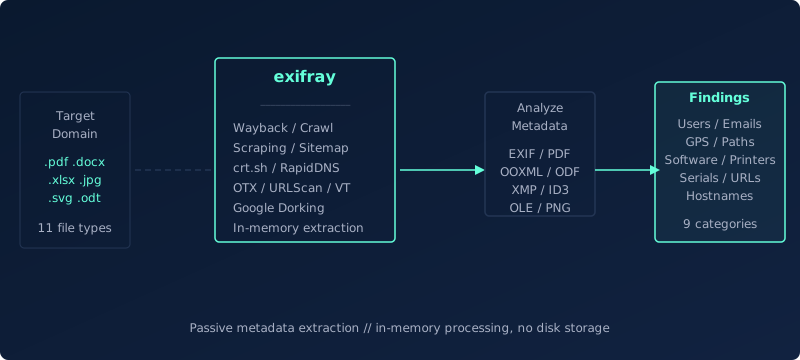
exifray discovers publicly accessible files on target domains, downloads them in memory and extracts metadata without writing anything to disk. It queries 12 sources (passive archives, search engines, scraping) to locate files, then parses EXIF, PDF properties, OOXML/ODF structures, XMP and more to surface sensitive findings: usernames, emails, GPS coordinates, internal paths, software versions, printer names and serial numbers. Results are deduplicated and grouped by category. Supports batch processing, proxy routing, rate limiting and JSON output for pipeline integration.
How it works
Discovery
Queries up to 12 sources (passive archives, search engines, scraping) to locate file URLs on the target domain
Deduplication
Consolidates results from all sources, removes duplicates and filters by file extension
Extraction
Downloads files in memory and extracts metadata from EXIF, PDF properties, OOXML/ODF, XMP and more
Analysis
Scans extracted metadata for sensitive data across 9 categories: users, emails, GPS, software, paths and more
Output
Presents deduplicated findings grouped by category with optional JSON export
Features
- 12 discovery sources (10 free, 2 API-based)
- In-memory file processing: downloads and analyzes without disk storage
- 9 detection categories: GPS, users, emails, software, printers, serials, paths, URLs, hostnames
- 11 file type families: JPEG, TIFF, PNG, PDF, DOCX/XLSX/PPTX, ODT/ODS/ODP, SVG, MP3, DOC/XLS/PPT, GIF, WebP/BMP
- XMP metadata extraction from any compatible file
- GPS findings include Google Maps links for quick verification
- Deduplication across sources and within metadata findings
- Custom file extension filtering
- Source selection: run only specific discovery methods
- Proxy support (HTTP, SOCKS5)
- Rate limiting and configurable timeout
- Batch processing with domain list input
- JSON output and file export for automation
- Quiet mode: one finding per line for piping into other tools
- Show source URLs per finding with --show-urls
- Config file for API keys ($HOME/.exifray.conf)
Discovery Methods
| Method | Type | Description |
|---|---|---|
| Wayback Machine | Included | CDX API for historical file URLs from web.archive.org |
| Common Crawl | Included | CC Index API for URLs from Common Crawl datasets |
| AlienVault OTX | Included | Domain URL lists (optional API key improves rate limits) |
| URLScan.io | Included | Search API for indexed file URLs (optional key increases limits) |
| Web Scraping | Included | Crawls target sites and extracts file URLs from HTML |
| Sitemap | Included | Parses sitemap.xml and linked sitemaps for file references |
| HackerTarget | Included | Host search API for domain-associated URLs |
| crt.sh | Included | Certificate Transparency logs for subdomain discovery |
| ThreatMiner | Included | Threat intelligence API for domain-associated URLs |
| RapidDNS | Included | Subdomain discovery via rapiddns.io |
| VirusTotal | Free API | Domain endpoint URL discovery (500 free lookups/day) |
| Google Search | Paid API | File-type dorking via Custom Search API |
Usage Examples
exifray -d example.com
Scan a domain using all free sources
exifray -d example.com --json -o results.json
Export findings to JSON file
exifray -d example.com -e pdf,docx,xlsx
Scan only specific file types
exifray -d example.com --sources wayback,scrape,sitemap
Use only specific discovery sources
exifray -d example.com --show-urls
Display source file URLs alongside each finding
exifray -l domains.txt -w 50
Batch processing with increased concurrency
exifray -d example.com --proxy socks5://127.0.0.1:9050
Route through a proxy
exifray -d example.com --rate-limit 5
Limit request rate to 5 per second
exifray -q -d example.com
Silent mode for automation
subfinder -d example.com -silent | exifray
Pipe domains from subfinder
exifray -q -d target.com | grep "^\[Users\]" | cut -d' ' -f2-
Filter findings by category with standard tools
exifray -d target.com --json | jq '.findings[] | select(.category == "GPS")'
Extract GPS findings from JSON output with jq
Options
| Flag | Description |
|---|---|
| -d, --domain | Target domain (required unless -l or stdin) |
| -l, --list | File containing domain list (batch mode) |
| -e, --extensions | Custom file extensions, comma-separated |
| -s, --sources | Sources to use, comma-separated (default: all) |
| -o, --output | Write results to file (JSON format) |
| -c, --config | Config file path (default: $HOME/.exifray.conf) |
| -w, --workers | Concurrent worker threads (default: 20) |
| --timeout | HTTP timeout in seconds (default: 15) |
| --rate-limit | Max requests per second, 0 = unlimited (default: 0) |
| --proxy | Proxy URL (http:// or socks5://) |
| --json | Output results as JSON |
| --show-urls | Display source file URLs per finding |
| -v, --verbose | Enable verbose output |
| -q, --quiet | Silent mode: findings only, one per line |
| --version | Print version and exit |
| -h, --help | Display help information |