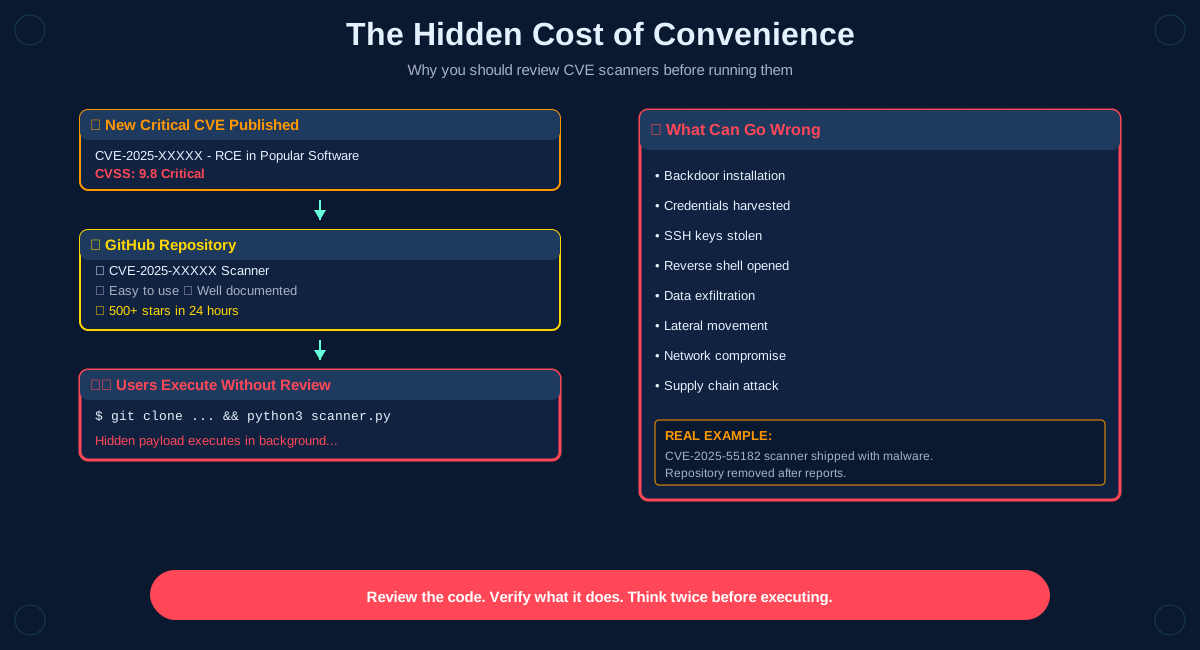
Every time a critical CVE drops, the same pattern repeats. Someone publishes a scanner. People download it. Some of them regret it.
The cycle is predictable. A new vulnerability gets disclosed. Within hours, GitHub repositories appear claiming to test for it. The tools look professional. They have documentation. They get stars. People trust them and run them without reading the code.
Sometimes that works out fine. Sometimes it doesn't.
A recent example involved CVE-2025-55182. A scanner appeared on GitHub shortly after the CVE was published. It did exactly what it claimed to do: it tested for the vulnerability. It also shipped malware.
The repository has since been removed after being reported. The code is still visible through archived copies if you know where to look. But the damage was already done to whoever ran it before it got taken down.
This isn't new. It's happened before and it will happen again. The pattern is always the same.
A critical vulnerability gets announced. Security researchers and organizations scramble to understand their exposure. They need to know if they're vulnerable. They need to know fast.
That urgency creates an opportunity. Someone publishes a tool that promises to check for the vulnerability automatically. No need to read through the CVE details. No need to understand the technical specifics. Just download, run and get your answer.
It sounds convenient. Convenience has a cost.
The problem is trust. When you download and execute code from a random GitHub repository, you're trusting the author's intentions, trusting the code does what it says and trusting nobody has compromised the repo.
Those are big assumptions. They're often wrong.
Malicious actors know this pattern. They know people will be searching for scanners right after a CVE drops, that security teams are under pressure and that urgency beats caution.
So they publish tools that look legitimate. Clean README files. Professional-looking code. Maybe even some basic functionality that actually works. And somewhere in that code, hidden among the legitimate scanning logic, there's a payload.
What that payload does varies. Sometimes it's a backdoor. Sometimes it harvests credentials. Sometimes it exfiltrates SSH keys or AWS tokens. Sometimes it opens a reverse shell. Sometimes it installs cryptocurrency miners.
The specifics don't matter as much as the principle: you gave an untrusted actor execution privileges on your system. Whatever they wanted to do, they can now do.
The fix is straightforward but requires discipline: review the code before you run it.
Read through the script. Understand what it's doing. Look for network calls. Check what files it accesses. Verify that it's not downloading additional payloads. Make sure it's not sending data anywhere it shouldn't.
This takes time. That's the point. The time you spend reviewing code is protection against running something malicious.
If you don't have time to review the code, you don't have time to run it. Use official tools from trusted vendors. Wait for established security projects to release their scanners. Or write your own based on the CVE details.
The urgency to know if you're vulnerable is real. But running untrusted code to find out is trading one risk for another. And the risk you're taking on by executing malicious code is often worse than the risk posed by the vulnerability itself.
Think about what you're actually doing when you run a random scanner from GitHub:
You're downloading code from someone you don't know and running it with your user privileges, possibly as root. That gives it access to your filesystem, your network, your credentials, your environment variables. And you're trusting it won't abuse any of that.
That's a lot of trust to place in a repository that appeared hours ago and has no established reputation.
Some practical guidelines:
Look at the author first. Do they have a history of legitimate security work? Are they known in the community? Do their other repositories look trustworthy?
How old is the repository? Was it created today? That's a red flag. Legitimate researchers usually have established accounts.
Read the code. Actually read it. Line by line if necessary. If you don't understand what a section does, don't run it until you do.
Watch for network activity. Does the tool make unexpected network requests? Does it connect to domains you don't recognize? Does it upload data anywhere?
Review the dependencies. What libraries does it import? Are those legitimate packages or could they be malicious?
Use sandboxing. If you must test something questionable, run it in a container or VM that's isolated from your main environment and doesn't have access to sensitive credentials.
The CVE-2025-55182 scanner wasn't sophisticated. The malicious code was visible if you looked. But most people didn't look. They saw a tool that solved their immediate problem and they ran it.
That's the vulnerability being exploited. Not a technical flaw in software. A human tendency to prioritize convenience over security when under pressure.
The attackers are betting that you won't read the code. They're betting that the urgency to assess your CVE exposure will make you skip the steps you'd normally follow. They're often right.
Don't be part of that pattern. When a new CVE drops and scanners start appearing, resist the urge to immediately download and run them. Take the time to verify what you're executing. Your security posture will be better for it.
The few minutes you spend reviewing code could save you from a compromise that takes weeks or months to fully remediate.
Review the code. Verify what it does. Think twice before executing anything from untrusted sources.
